Insta360 Pocket camera protection · B2B sourcing
Insta360 Pocket Camera Protector
Source model-specific tempered glass protection for an Insta360 Pocket camera range. Identify the exact camera and the screen or lens area you need to protect, then discuss quantities and packaging with JJT.
Share the exact camera model and identify the screen or lens area required. Check outline, coverage, controls and moving-part clearance with a sample before approving the order.
01 / Camera fit
Select the camera and protected area.
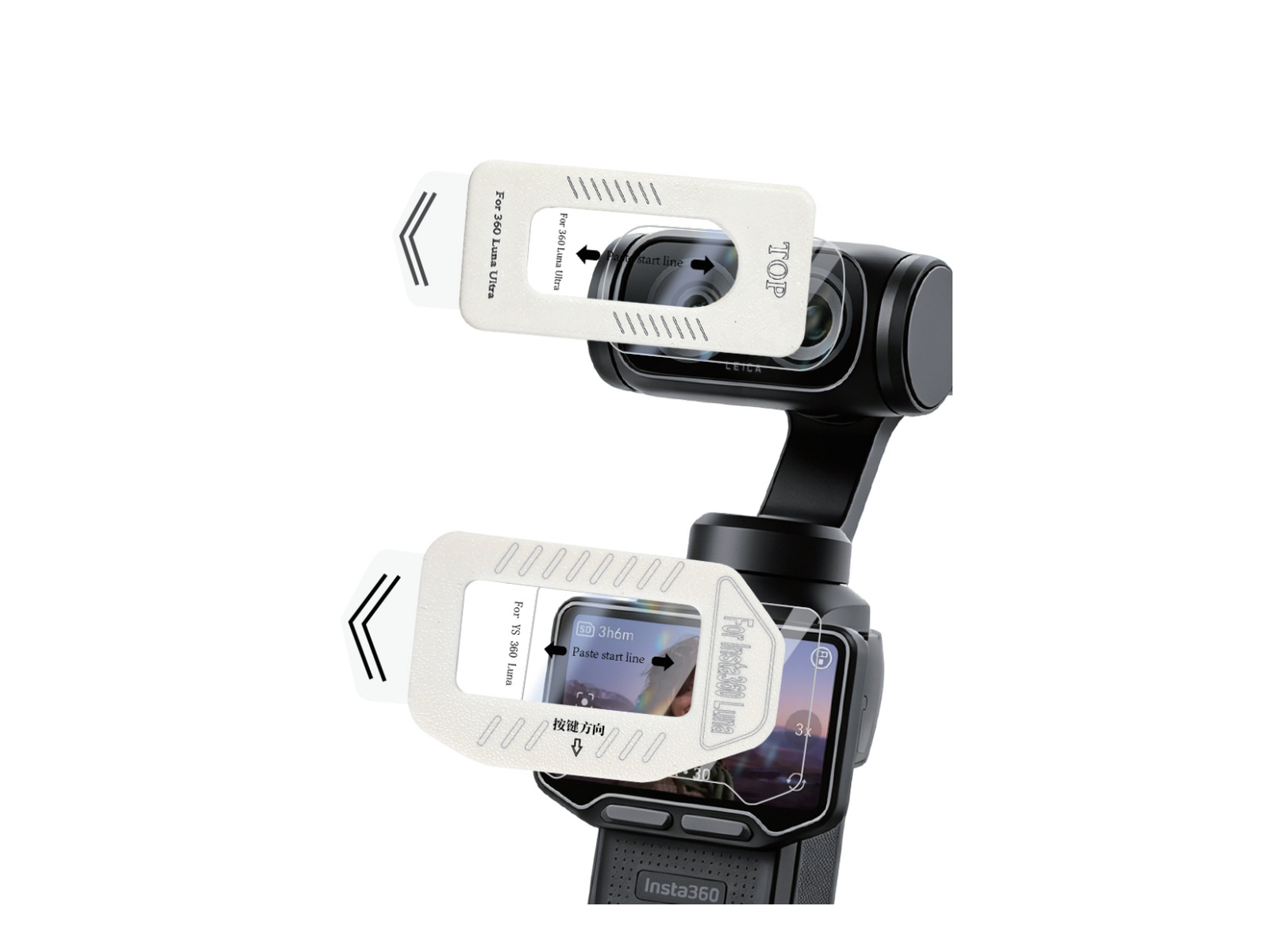
The Insta360 Pocket reference shows transparent protection at the camera head and lower screen. The catalogue identifies tempered glass; the image does not establish a confirmed model list or the contents of an order.
Send the exact camera model and the area requiring protection. Confirm whether your request concerns the screen, lens area or another agreed configuration; do not use the Pocket family label alone to determine fit.
Find the exact camera’s user manual in the official Insta360 downloads before checking controls and moving-part clearance with your selected sample.
Review outline, protected area, installation and clearance with the selected sample. Confirm the product and included items in the quotation.
02 / Your channel
Build an Insta360 Pocket camera range by exact fit.
Wholesale & distribution
Keep model information clear across stock lines.
Confirm the exact Insta360 camera model, selected screen or lens area, protector outline and clearance with a sample. Record the agreed product and supplied items in the quotation.
Private-label brands
Plan the pack around the selected product.
Build your retail pack around a model-specific Insta360 Pocket camera protector. Approve the artwork and included items, then keep the product and packaging versions identifiable for repeat orders.
Retail & installation
Make the supplied items clear to your customer.
Discuss the selected installation accessories and pack contents. Review availability and the installation workflow with a sample before confirming the order.
03 / Product & fit
The product reference.
The details you approve.
Use the reference image to distinguish the camera-head and screen positions. Confirm the selected tempered glass configuration on the exact device; review actual coverage and clearance before approving a sample.
Protected area
Identify the selected screen or lens area and compare the protector outline with the exact camera. The reference image does not promise that both pieces are supplied together.
Placement & operation
Review positioning, control access and moving-part clearance on the intended camera. Confirm any installation accessories and instructions for the agreed product.
Insta360 Pocket camera protector reference
The catalogue identifies tempered glass and illustrates protection at camera-head and screen positions. Confirm exact model fit, selected area and pack contents; no complete kit or included installation tool is established by the image.
05 / Supply format
Protectors for your range.
A pack for your brand.
Discuss Insta360 Pocket camera protectors, selected installation accessories and private-label packaging. Confirm the supplied items, model labels and artwork with the quotation and sample.
The image is a product reference. Pack contents and installation accessories are agreed per order.
Protector supply
For buyers arranging their own pack assembly; agree the supplied protector configuration and quantities.
Selected installation accessories
Discuss availability for the selected model and confirm the included items. Approve the installation workflow with a sample.
Your brand, ready for retail
Discuss logo, model labels and packaging requirements. Confirm availability, artwork, included items and any custom-order conditions in the quotation.
See the installation
From sample to an approved fit.
Request the installation guidance for the selected Insta360 Pocket camera protector. Review the screen or lens position, controls and moving-part clearance with the intended camera and approved sample.
From model list to agreed order.
Request model-specific quantities, minimum-order requirements, sample conditions and the delivery schedule in your quotation. These terms are confirmed for the selected product and order.
Define the range
Exact Insta360 camera model, screen or lens area, selected protector, quantities, pack contents and destination.
Review the quotation
Product selection, packaging, MOQ, sample terms and lead time.
Approve the sample
Review the selected sample and document the agreed product configuration and packaging before confirming the order.
Confirm the order
Agreed product, model-specific quantities and commercial terms.
Arrange delivery
Confirm the dispatch arrangement and destination with the quotation.
Answers for confident sourcing
How do I define the product for a quotation?
Send the exact camera model, protected area, selected configuration and quantities. Ask JJT to confirm the product and supplied items for each order line.
How should I review a sample?
Compare outline, placement, coverage, screen visibility where relevant, control access and moving-part clearance on the intended camera. Request any product-specific specifications you need before approval.
What are the sample and minimum-order terms?
Ask for sample availability, charges and minimum quantities for the exact product and packaging request. Confirm any trial-order conditions in the quotation.
How are quality concerns handled?
Provide the order reference, affected product and quantity, and clear photographs of the issue. Confirm the applicable resolution process and commercial terms with JJT for your order.
Can I combine models or protected areas in an order?
Send separate lines for each exact model and screen or lens configuration. Ask JJT to confirm which items can be combined and any quantity or packaging conditions.
What packaging can I request for my brand?
Share logo, model-label and packaging requirements. Confirm availability, artwork approval, included items and customisation charges in the quotation.
When can samples and orders be dispatched?
Request an order-specific sample and dispatch schedule. Confirm the required approvals, payment conditions and destination before arranging delivery.
Does the Insta360 Pocket reference establish model fit or a complete kit?
No. The reference illustrates camera-head and screen positions, while the catalogue identifies tempered glass. Confirm the exact camera model, selected screen or lens area, protector configuration and pack contents with JJT; the image does not establish a complete kit or included installation tools.
Let’s talk products
Your next range starts here.
Tell us your exact device models, quantities and packaging requirements.
Insta360 Pocket Camera Protector